Your Memories Feature Looks Simple. The Infrastructure Behind It Isn’t
Your Memories Feature Looks Simple. The Infrastructure Behind It Isn’t
A few circular thumbnails, a full-screen player, and a familiar swipe gesture can make a memory feature look like a small frontend task. Then real users arrive with incomplete uploads, years of media, unreliable connections, and multiple accounts. Suddenly, the feature depends on far more than the interface. For companies evaluating photo memories infrastructure for apps, the real question is what must happen before that first memory appears. Developers need reliable workflows, product teams need measurable value, and business owners need costs they can understand. Choosing a SaaS platform starts with making those hidden responsibilities visible.
The Interface Is Only the Final Layer
Designing photo memories infrastructure for apps starts before a user taps a story ring. The system must identify available media, associate it with the correct account, process useful information, assemble results, and deliver them to the application. A memory SDK for Android apps also needs loading states, empty states, playback controls, and recovery behavior.
Consider an established cloud storage app adding a memories carousel. Its existing upload service may work reliably, but that does not automatically provide a memories pipeline. The team still needs to decide when an asset becomes eligible, how updates affect existing results, and what happens when processing fails. Designing memories for cloud storage apps therefore requires a feature lifecycle, rather than simply another screen.
This distinction shapes the build vs buy memories SDK discussion. A production estimate must include backend ownership, support procedures, operational monitoring, and integration testing. When those responsibilities remain unassigned, they tend to emerge late, after launch commitments have already been made.
FAQ: Why does a memory feature need backend infrastructure?
Photo memories infrastructure for apps must deliver prepared, account-specific results and a dependable way to retrieve them. Rendering thumbnails alone does not address processing, ownership, delivery, or updates.
How FyreMemories Is Dealing With It
FyreMemories’ product overview describes a platform combining media processing with carousel and feed components. Its memory SDK for Android apps gives teams an integration path that connects the visible experience to supporting services, while allowing different levels of interface control.
Upload Events Need Reliable Processing
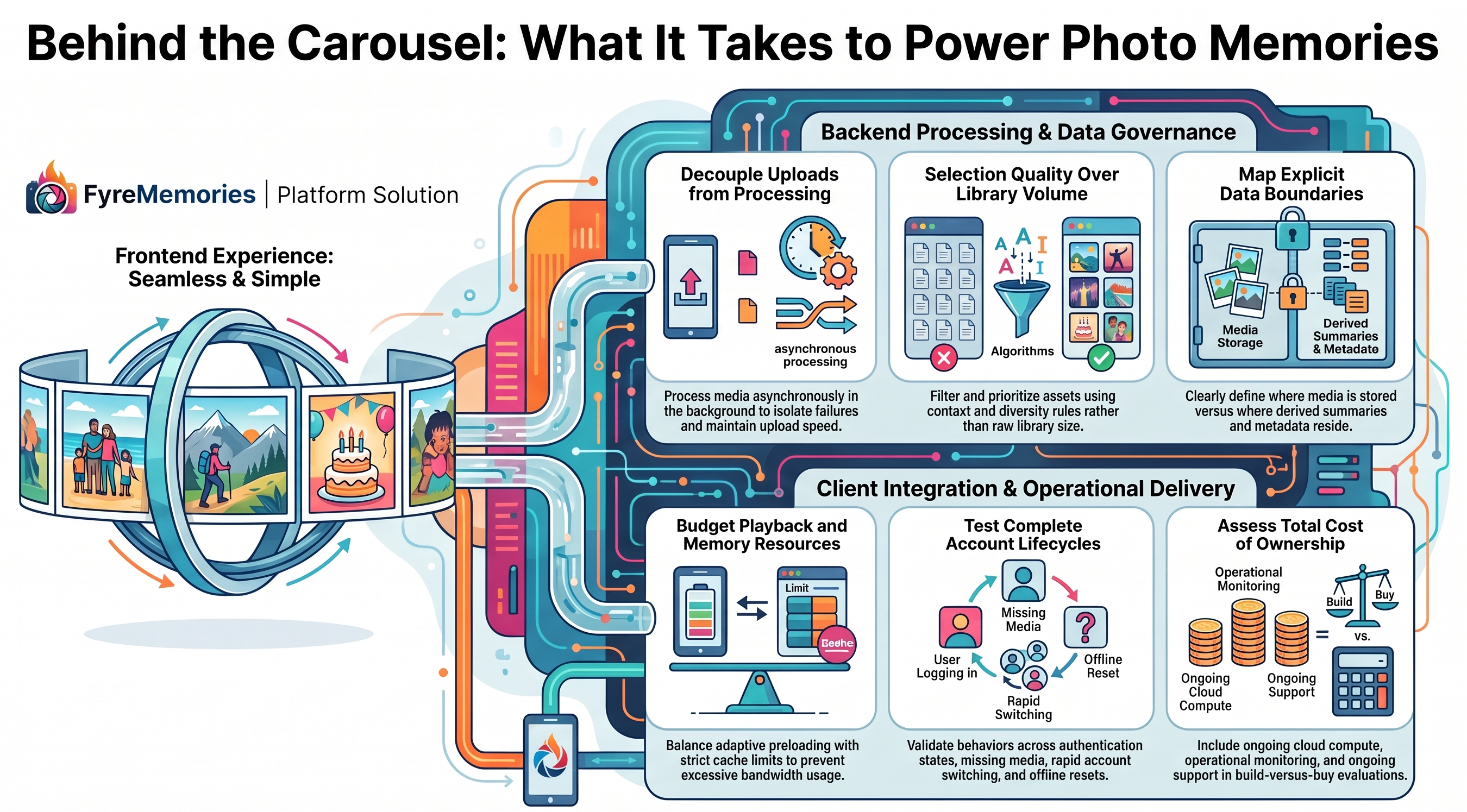
An upload should initiate a controlled workflow, with a clear distinction between receiving a file and publishing a memory. Reliable photo memories infrastructure for apps records processing status and makes unfinished work observable. Otherwise, a successful upload can create the expectation that the associated memory should appear immediately, even when downstream work remains incomplete.
Event handling deserves scrutiny in a build vs buy memories SDK review. Amazon S3. A consumer should therefore tolerate receiving the same event more than once. Using an asset identifier and processing version as a deduplication key can help prevent duplicate work. Retry policies should distinguish temporary service failures from files that cannot be processed successfully.
For photo memories infrastructure for apps, the operational question is whether one problematic asset can delay unrelated work. Teams should isolate failures, limit retries, and provide a way to inspect exhausted jobs. Existing libraries introduce another concern for memories for cloud storage apps: historical processing should have a defined capacity budget so that importing older content does not overwhelm new uploads. They affect costs.
FAQ: Should memory processing run inside the upload request?
Usually, separate it from the user’s upload response. Background processing allows independent retries and capacity management without making the upload experience depend on every downstream operation.
How FyreMemories Is Dealing With It
The platform architecture describes processing triggered by upload events inside the customer’s cloud. Summaries then flow into its data and memories layers. During a build vs buy memories SDK evaluation, teams should ask how retries, historical imports, and failure visibility are handled in their deployment.
Useful Memories Require More Than Available Files
A directory of media is an input, not a finished experience. Product teams designing memories for cloud storage apps must define what makes a collection worth opening. That might involve time, context, diversity, or avoiding repeated exposure to the same assets. Engineering needs explicit rules for eligibility, ordering, freshness, and situations where there is too little suitable content.
For memories for cloud storage apps, uneven libraries deserve special attention. One account may contain thousands of recent videos; another may contain a handful of old photographs. The design of memories for cloud storage apps should accommodate both without filling every available space merely to make the interface look complete. A thoughtful empty state can be more useful than a weak collection that teaches users to ignore the feature.
Evaluation should include representative libraries and feedback from people who understand the intended audience. Define how unsuitable content can be excluded and how changes propagate into future results. A build vs buy memories SDK review should document these requirements instead of assuming capabilities. When comparing photo memories infrastructure for apps, request a clear explanation of how source information becomes a user-visible collection and where your team can influence that process.
FAQ: Does a larger media library automatically produce better memories?
No. More files create more candidates, but usefulness depends on selection quality, appropriate context, and avoiding repetitive or unsuitable results. Test the experience across different library sizes.
How FyreMemories Is Dealing With It
FyreMemories describes a workflow where media summaries are indexed and used to build memories for individual users. Companies can use that architecture as the starting point for discussing selection behavior, supported inputs, and the controls required for their own product.
Smooth Playback Is a Resource Allocation Problem
When using a memory SDK for Android apps, perceived quality depends on how quickly it becomes watchable and how consistently playback continues. Fetching a feed successfully does not guarantee that its next video is ready. Teams should examine startup delay, buffering, thumbnail readiness, device memory, and network usage as separate parts of the experience.
Preloading can reduce waiting by preparing likely next content, but it consumes resources before the user requests them. Aggressive fetching can waste bandwidth when someone leaves after one item. A deliberate policy should consider how much to prepare, when to cancel work, and how the player releases resources after navigation. Testing memories SDK for Android apps should include constrained devices and interrupted sessions, rather than only fast office connections.
Caching introduces trade-offs within photo memories infrastructure for apps. Keeping previously fetched content may improve repeat access, but a cache needs limits, eviction behavior, and rules for stale or inaccessible assets. Teams should measure the user experience alongside downloaded bytes and storage consumption.
FAQ: Will preloading every video eliminate playback delays?
No. Downloading everything can waste resources and compete with current playback. The objective is to prepare likely next content within defined bandwidth, memory, and storage budgets.
How FyreMemories Is Dealing With It
FyreMemories lists adaptive preloading, playback controls, and caching among its features. Its memories SDK for Android apps exposes player and cache configuration. A build vs buy memories SDK assessment should still test those settings against the application’s expected devices, media, and network conditions.
Data Boundaries Must Be Explicit
Personal media makes decisions about photo memories infrastructure for apps, especially consequential. Teams need to know where original files are processed, what derived information leaves their environment, where results are stored, and which systems authorize access. A statement about retaining source files does not answer every question about summaries, generated memories, logs, or cached data.
When evaluating memories for cloud storage apps, draw the data path across the customer environment, provider services, and mobile device. Label each transfer with its purpose and access requirements. Then examine account switching, permission changes, and deletion requests. The goal for memories for cloud storage apps is a documented lifecycle for every relevant data category, with responsibilities agreed before integration begins.
For photo memories infrastructure for apps, revocation deserves the same attention as creation. If an asset becomes unavailable, teams should understand how associated results and cached copies are handled. During a build vs buy memories SDK review, ask providers to explain these workflows and identify limits. Clear answers reduce implementation ambiguity and help support teams respond accurately when customers ask what happens to their content.
FAQ: Does keeping original files in our cloud mean no data leaves it?
No. A service may retain originals locally while transferring summaries or other derived information. Review each data category and its destination instead of relying on a single broad statement.
How FyreMemories Is Dealing With It
FyreMemories states that processing runs in the customer’s cloud with read-only storage access, while summaries move downstream and memories reside in FyreMemories systems. Its ownership boundaries provide a useful starting point for reviewing permissions, derived data, and deletion responsibilities together.
Integration Continues Beyond the First Successful Demo
Installing a memories SDK for Android apps and opening a feed proves that the basic path works. Production integration must also cover authentication timing, lifecycle changes, account transitions, errors, accessibility, and design consistency. These details determine whether the feature behaves like part of the host application or feels disconnected from the surrounding experience.
Teams comparing memories SDK for Android apps should test fresh sign-ins, returning sessions, sign-outs, and rapid account switching. They should also verify what happens when the app resumes after backgrounding or loses connectivity during playback. Test memories for cloud storage apps with accounts lacking eligible media. A missing collection should produce an intentional state, rather than look like an unexplained failure.
Customization in a build vs buy memories SDK comparison should reflect actual product needs. Some teams can launch with standard components; others require custom navigation, analytics, or presentation. In a build vs buy memories SDK decision, identify which responsibilities remain with your engineers under each integration option. Greater control may be valuable, but it usually creates additional implementation and testing work that belongs in the estimate.
FAQ: Should every team choose a headless integration?
No. Choose it when owning the presentation justifies the extra work. A component-based memory SDK for Android apps may better suit teams whose priority is validating the feature and reducing initial implementation scope.
How FyreMemories Is Dealing With It
FyreMemories offers carousel, full-screen, and headless integration options. Its memory SDK for Android apps requires initialization after Firebase sign-in and cleanup during sign-out. These documented requirements give developers concrete behaviors to include in their integration review and account lifecycle tests.
Analytics Must Explain Behavior and Business Value
Opening a feed is only the beginning of measuring memories for cloud storage apps. Teams should distinguish discovery, playback, completion, interaction, and later return visits. Without that separation, an attractive entry point can appear successful even when people abandon the experience immediately. A build vs buy memories SDK pilot should consider both technical quality and content relevance when interpreting results.
For memories for cloud storage apps, define a product hypothesis before rollout. Perhaps memories for cloud storage apps will encourage repeat sessions, or sharing will increase meaningful interaction. Establish the baseline, identify eligible users, and decide what observation period makes sense. Where practical, compare equivalent groups with and without the feature. Raw activity increases alone cannot establish that memories caused better retention.
Instrument the failure path as carefully as the successful one. A low completion rate could reflect uninteresting content, playback friction, or an interruption elsewhere in the app. Reviewing behavior alongside errors helps teams choose an appropriate response. When evaluating memories SDK for Android apps, investigate event definitions and export options so that vendor metrics can fit your existing measurement approach.
FAQ: Can more memory views prove that retention improved?
No. Views show activity within the feature. Retention requires measuring return behavior over time and accounting for differences between users who engage with memories and those who do not.
How FyreMemories Is Dealing With It
FyreMemories advertises watch-time, completion, and drop-off analytics, alongside interaction features. Its memory SDK for Android apps also documents a custom analytics sink. Teams can review these measurement capabilities against their own event definitions and connect feature usage to broader product reporting without assuming a guaranteed retention uplift.
Evaluate the Operating Model Before Choosing SaaS
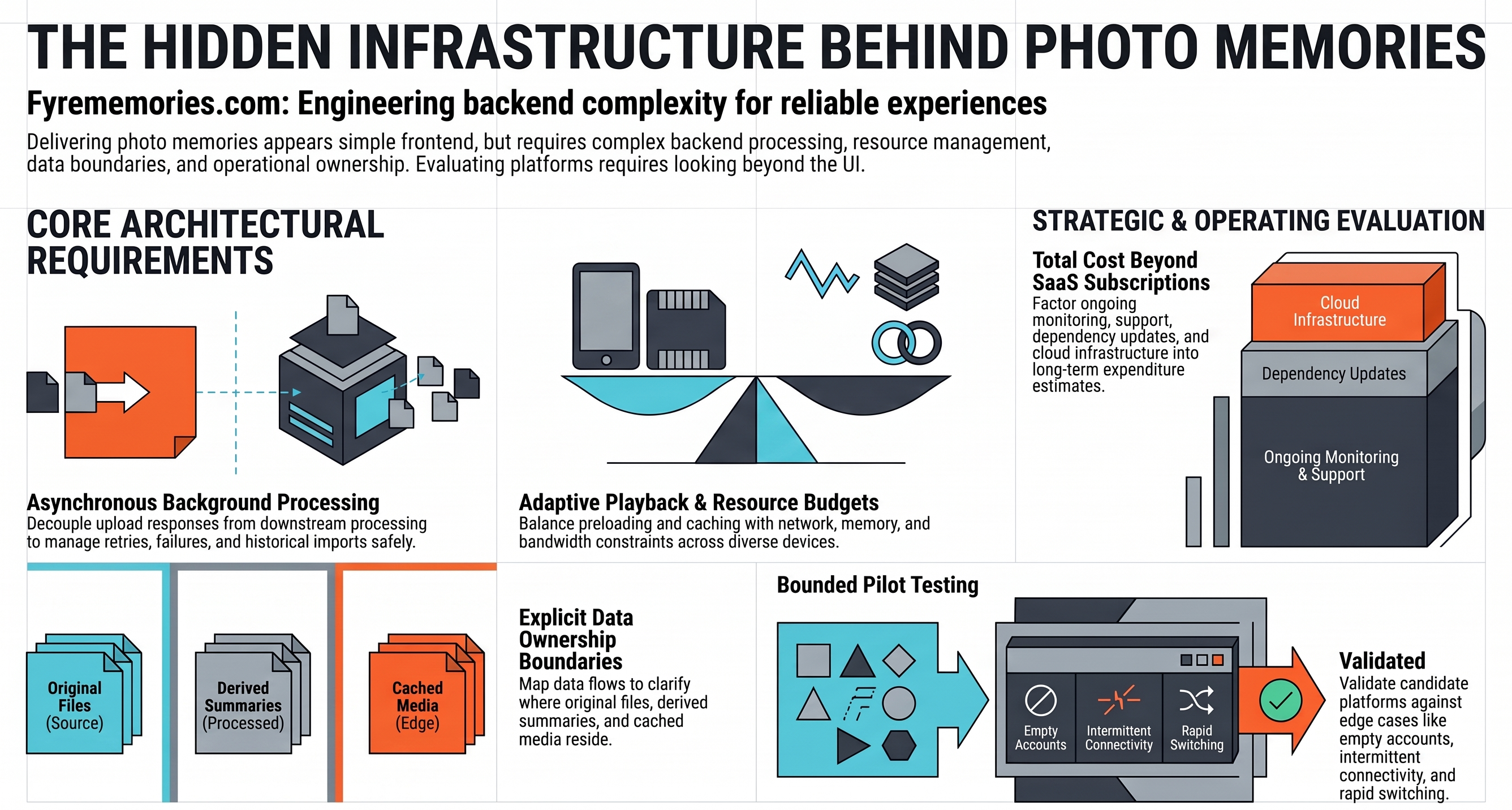
Evaluating photo memories infrastructure for apps requires accounting for work that continues after release. Compare development, cloud consumption, maintenance, monitoring, support, and future changes. Separate provider charges from costs that remain in your environment. Otherwise, a subscription comparison can overlook processing expenditure or internal responsibilities that materially affect the business case.
The build vs buy memories SDK discussion becomes more useful when both options are evaluated against the same production requirements. Ask who investigates failed processing, supports new devices, manages dependency updates, and handles incidents spanning multiple systems. Confirm service expectations and escalation paths directly. Clear ownership of photo memories infrastructure for apps helps prevent problems from bouncing between the application team and its provider.
Before committing, run a bounded pilot with representative media and agreed success criteria. Measure integration effort, processing behavior, playback quality, and support responsiveness. For companies adding memories for cloud storage apps, this pilot turns a persuasive demo into evidence for a practical purchasing decision.
A build vs buy memories SDK pilot establishes acceptance criteria before anyone sees the polished interface. Specify how long the team will observe processing, which device classes must be covered, and what constitutes a blocking issue. Include missing media, duplicate notifications, empty accounts, and interrupted playback in the review. It also makes follow-up discussions more productive because questions refer to observed behavior instead of broad promises about reliability, scale, or effortless integration.
Budget for the work around the dependency as well. Comparing memories SDK for Android apps should include authentication changes, release coordination, regression checks, and ongoing ownership of the host application. These costs may be smaller than a custom build, but documenting them makes the commercial comparison more credible and prevents surprises after the initial demonstration has ended.
FAQ: When does buying a memories platform make sense?
It makes sense when the provider meets your requirements and reduces total delivery and operating effort. Building remains reasonable when essential differentiation or constraints require capabilities that available services cannot supply.
How FyreMemories Is Dealing With It
FyreMemories positions its platform as a way to combine processing and a configurable app experience. Review its product options with your team, then request deployment and commercial details that match the pilot’s workload, ownership requirements, and expected growth.
Conclusion
The simplicity users see is the result of decisions across processing, delivery, playback, data ownership, integration, and measurement. Treating those decisions as part of the product creates a more realistic roadmap and a stronger technical evaluation process. Teams selecting photo memories infrastructure for apps should therefore examine the complete operating model, including the work that remains inside their organization.
For developers, that means testing lifecycle behavior and failure recovery. For product leaders, it means connecting the experience to a measurable user benefit. For business owners, it means understanding recurring costs and responsibility boundaries. Approach build vs buy memories SDK as an evidence-led decision, then explore FyreMemories with a representative pilot that shows how the platform fits your application, your media, and your team.
Ship the feature this week, not next quarter.
FyreMemories is a production-ready memories SDK for Android. One dependency, one afternoon to integrate.